Tuesday, 26 June 2007

20 Must-Have Firefox Extensions

Found out that I wrote so much on Firefox add-ons that it's better to just redirect. :D

If you're still not convinced why Firefox is the better browser amongst all it's competitors, I hope this article shines more light.

It talks about the top 20 Firefox add-ons in each of the following categories.

Plenty of great things to check out, so well.. check it out! :D

Answers in Firefox

This must have been one of the coolest add-on in Firefox that I've come across. :D

Some questions:

  • Do you read blogs/articles/news online?
  • Do you hate to be puzzled by a word that you dint know?
  • Do you go to dictionary.com, or any other online language resource reference in that matter, to check up words?
  • Do you want to improve your vocabulary?
If your answer is "Yes" to any of the above questions, probably what I'm going to introduce to you might be of most helpful. :)

Firefox Answers.

Every time when I'm reading there's bound to be chances of stumbling upon difficult words, and what I would usually do will be:
  • 1. Open up a new tab in Firefox.
  • 2. Type "www.dictionary.com" and press Enter.
  • 3. Wait for the page to load.
  • 4. In the search box, type the word in query, and press Enter.
  • 5. Wait for the page to load... again. :S
  • 6. The meaning of the word appears.
What a hassle! I had to live with that kind of flow because I couldn't find a better one. One fine day, while reading the web, I came to know of Answers. After installing this little thing, it blew me OFF! :D

This is my new flow of finding out the new word:
  • 1. Press the Alt key, and right mouse click on the word.
Ermz.. I'm done you know? haha.. It's just that simple! Alt-click Alt-click. The beauty of this add-on is that Answers is not limited to just words. If it detects that it's a phrase, it'll even look that up and bring the answers(well literally? hehe..) right to your web! :D

Please enjoy. I know you will. ;)

Dreamy iPhone~~


This is no new news. iPhone will be launched in US in 3 more days, 29 June 2007, and it's probably the biggest gadget bang this year. But right about a week ago, Apple announced that the dreamy iPhone has just gotten better. :O

Now check this out:

  • Talk Time: 8 hours
  • Standby Time: 250 hours (more than 10 days!)
  • Internet Use: 6 hours
  • Video Playback: 7 hours
  • Audio Playback: 24 hours
See the full technical specifications.

It's astounding stats from any angle that I see. I can get a 8GB iPhone that plays my favourite songs(for even longer hours than my current ipod nano), podcasts, videocasts, while at the same time enjoying the long hours of talk time, and checking emails on any journey. Important thing is that I can finally use VelvetPuffin! :D Now how cool is that package? It's north-pole-cool. **brrr***

There's probably 2 areas that I'm very concerned about. The prone-to-scratch-glossy-surface, and that I'm a prone-to-drop-phone-person. :(

Apple addresses my first concern that "the entire top surface of iPhone.. has been upgraded from plastic to optical-quality glass to achieve a superior level of scratch resistance and optical clarity". Now how nice is that! :) I don't have to worry about scratching the surface now! **YAY!!**

BUT the glass gives me more reasons to worry than ever! I drop my phone so regulary(once a month on average), will the glass shatter? :S I mean I would rather have a scratchy phone than a phone that shatters if I do drop if you get what I mean. Furthermore, the advanced hardware that's in this baby might break after dropping once! That's why I always go for cheapskate phones(free ones especially). Not that their hardware won't break, but it's just that they're easily replaceable. sigh... :(

In an indirect way, I'm glad that the US market gets to be the first batch of guinea pigs. :P When iPhone eventually comes to Singapore, I'll most probably read up on some reviews before deciding if this is the phone for me. :)

Until then, this is just a **dream** phone. :P~~~~

Monday, 25 June 2007

Caricature and a Lobster!!

Thanks to 3D for her very nice caricature of me! Think she drew me till she nearly vomit. Not that it's hard work till vomit blood, but it's vomit cos have to keep staring at my face! wahahahaha... :D Note how much details she put into this illustration! My half open eyes (ever so tired), the flex book that I was obsessed with, the product I've been working on, velvetpuffin, and last but not least, my MBT shoes. *w00t~!*

Thanks to Arul for the damn cute red lobster you gave me! It has found itself a permanent place to stay (atop of the tissue box on my desk), and a permanent job tending to my mouse cord (look carefully at what the lobster's pincer are gripping!). :P Life at work will never be the same with the cute lobster's constant gaze at me. :D

Geek Blog Announced! Again?!

Wow, how many days had it been since I first announced my geek blog? hahaha.. just 2 weeks? :D

Anyway, I found that while it's great to get the wordpress blog, everything seems to be so limiting. I dint like any of those. In order to have the ability to change the Cascading Style Sheets(CSS), I have to pay USD15 a year? Forget it. Even blogger gives it for free. To add to my pain, I can't add any side widgets or tools and there's no upgrades I can buy to do that(not that I will really buy if there IS really an option. :P).

I was desperate.


That naturally lead me to the thought, shouldn't I get a hosting service for myself? It's high time if you ask me. :D I had my limited website on freewebs.com for way too long. Friends recommended godaddy.com, and so after checking out and comparing a lot of other hosting services, found that godaddy.com had the best deal of all!

For 4 kick-ass years of hosting service, I only paid SGD320! Did I mention that the package gave me 100GB of space and 1TB(terabyte) of bandwidth? haha.. It was absolute awesomeness. In addition to this, I shared the hosting with 3D, which meant another ~SGD75 off the bill. :D Can't get any cooler than that. ;)

Anyway, after all that long grandmother story, here's the link to my new geek blog:
http://blog.flashmech.net

And do check out my portfolio website!
http://www.flashmech.net

PS: I just have to say this. Wordpress on wordpress hosting sucks. But wordpress on your own hosting rocks big-time. :D It's no wonder that they're the winner of the Webware 100 in the publishing category. :D

Wednesday, 20 June 2007

Best FTP Client for Windows

File Transfer Protocol, or better known as FTP, is used to transfer data from one computer to another over the Internet, or through a network.

I've just gotten my web hosting service recently, so in other words, there's a whole new world out there for me to explore. But first and foremost, without a FTP client, I would not be able to put anything up for the world to see!

Here's my personal view of the attributes that a good FTP Client should have:
  • No Hassle
  • Intuitive Interface
  • Fast startup/load times
  • Small size/lite weight
  • Free :P


Windows Explorer 0/5


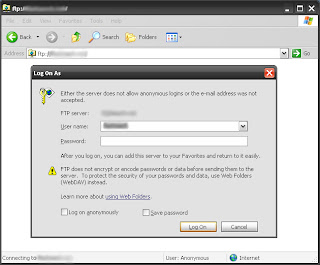
Never knew that Windows Explorer can be used as an FTP! :D It wasn't a good experience though (could be some settings that I set, not too sure on this). In fact, it was a pain to use. I mean, if I have to login EACH time to upload ONE file, that's a huge drawback! I needed to upload thousands of files, and if that's the message they're sending across, forget it.

Dreamweaver 3/5
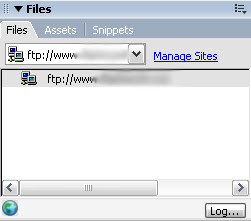

Strictly just rating dreamweaver as an FTP client here! First, the startup was pretty slow (well of course, it's a huge software to develop websites with!). Second, it's not free! Thirdly, somehow it always throws me an error message saying that it can't connect to my site, when others could. :(

(As a side note, I must add that the power to sync with your files at your hosting server while developing in dreamweaver through the FTP is absolutely dreamy. :D)

FileZilla 4/5


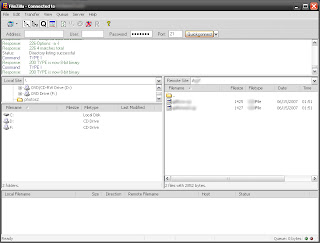
Open source, ease of use, pretty intuitive UI made me love this piece. :D Overall, it performs very well, and when I'm disconnected from the server, it connects me back. No fuss, no prompts (take that windows explorer!). The only major irk will be the directory panel, as it doesn't auto refresh (took me a while to find the refresh button too).

FireFTP 4.5/5


This is my winner. :) As an extension to firefox, it basically installs itself in my browser. No additional download to install, unlike FileZilla or Dreamweaver. Simple and great UI that overlooks your local drive files and your hosting files. Unlike FileZilla, FireFTP auto refreshes! Just in case it doesn't, which I have yet to experience, there's still an additional refresh button for your "mental security". :P

Why isn't it 5/5 then? Well, two minor issues. FireFTP does not show my "desktop" in the directory listing, which means I have to navigate to C:\Documents and Settings\{owner}\Desktop. FileZilla on the other hand, does that. :)

(Updated on 20 June 2007 17:45:00 SGT: Shunjie pointed out something important that I missed. Since FireFTP installs in your Firefox browser, it may be the only effective FTP that you can use if you're working on a limited access user account.)

Do you have a preferred FTP client?
Do you disagree with I wrote above? Leave me a note and let me know! :D

Thursday, 14 June 2007

Mouse Gestures in Firefox

I'm so happy! :D Found something that I lost for so long!

Have you heard of Mouse Gestures?

According to Wikipedia, a mouse gesture is a way of combining computer mouse movements and clicks which the software recognizes as a specific command.

I first came across mouse gestures in myIE2 (a free browser now better known as Maxthon). This technology totally changed the way I surfed the net! :D Opening a new tab was just a matter of holding down the left mouse button and clicking the right one. Closing a tab was vice versa. Back and forward had never been easier as well. Mouse gestures seems so intuitive, so natural to use. All actions are customisable according to your own liking too! ;)

myIE2 was not perfect though. It was based on the Internet Explorer(IE) browser engine, and as everyone knows, IE uses ActiveX which indirectly increases exposure to viruses. After a virus successfully attacked my computer sometime last year, I decided that it was simply not worth the risk, hence I dropped myIE2 to use Firefox.

If only I had searched earlier!! Came across this Mouse Gesture add-on for Firefox during one of my blog reads today and I immediately knew, the one thing that I so loved about a browser is now back in my hands! :D

muahahahahahaha.....

For those who have yet to try, I highly recommend it! It may change the way you browse the net. :)